
YouTube Video Downloader 1080p – Download Full HD

Watching a YouTube video in Full HD is great, but there are times when you may want to save a video for offline access, personal reference, editing, study, or later viewing.

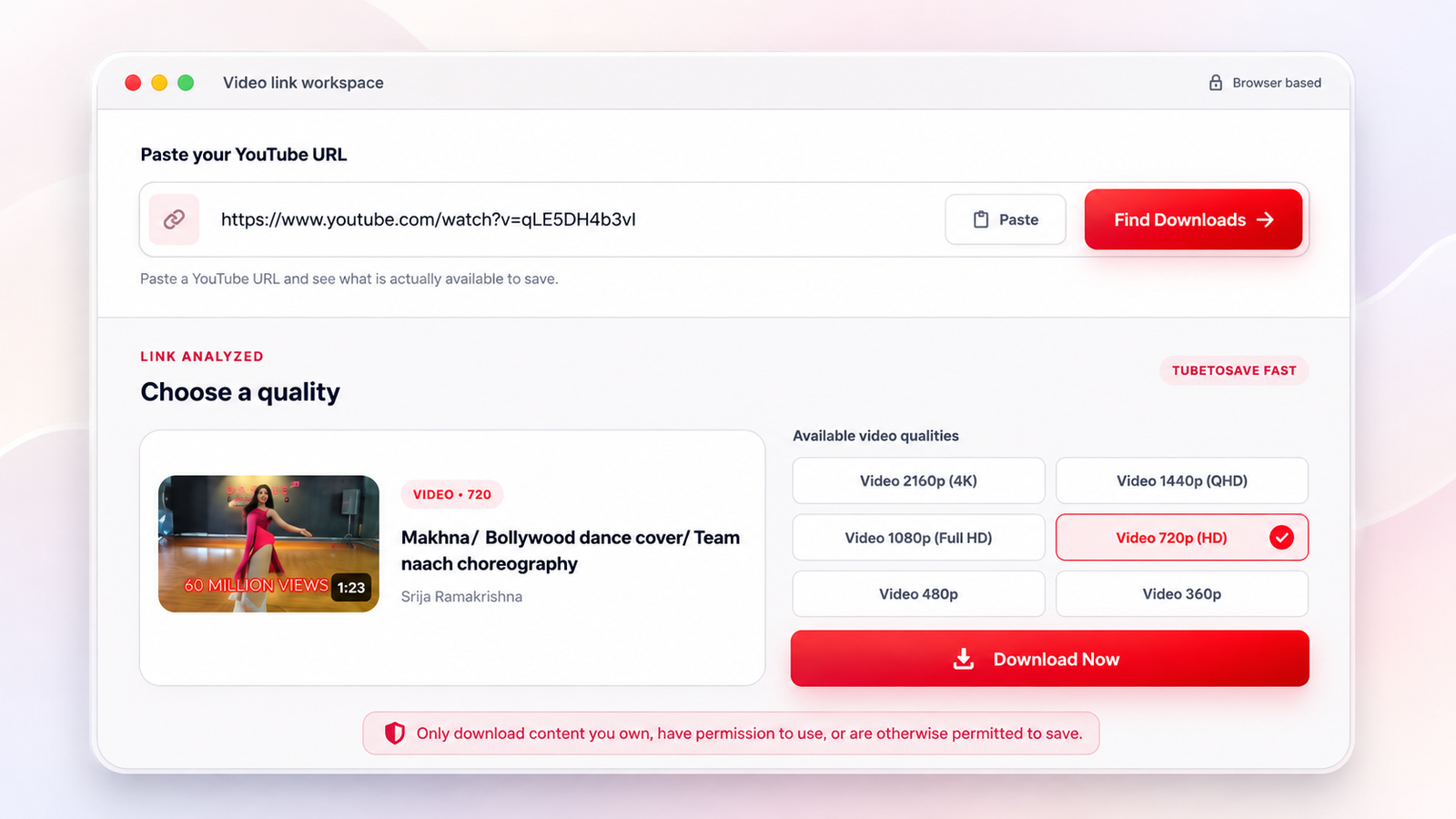
Paste a YouTube URL and see what is actually available to save.

Full HD

Download YouTube Videos in 1080p Full HD

1080p remains one of the most popular video resolutions because it provides a strong balance between picture quality and file size.

A 1080p video has a resolution of 1920 × 1080 pixels, which is commonly known as Full HD or FHD.

With our YouTube 1080p downloader, you can check whether a video is available in Full HD and choose the supported 1080p option directly from the available download formats.

This can be especially useful for:

  • Tutorials and educational videos
  • Lectures and presentations
  • Product demonstrations
  • Podcasts with video
  • Interviews
  • Travel videos
  • Gaming content
  • Music-related content
  • Documentaries
  • Creative reference videos

The available quality depends on the original YouTube upload. If the creator uploaded the video in 1080p or higher quality and the format is available for processing, TubeToSave can display the relevant Full HD option.
Standard Full HD
1080p
1920 × 1080
Crystal Clear
Aspect 16:9
Up to 60fps
Smooth Motion
Step-by-step

How to Download a YouTube Video in 1080p

Downloading a supported YouTube video with TubeToSave takes only a few steps.

Instant Download
  1. 1

    Copy the YouTube Video URL

    Open YouTube and find the video you want to process. Copy its URL from the browser address bar or use YouTube’s Share option to copy the video link.

    A standard YouTube URL may look similar to: youtube.com/watch?v=VIDEO_ID. Shortened youtu.be links can also be processed when supported.

  2. 2

    Paste the Link into TubeToSave

    Return to the TubeToSave YouTube Video Downloader 1080p tool and paste the copied link into the URL field. Make sure you paste the complete video URL so the tool can correctly identify the video.

  3. 3

    Find the Available Download Options

    Select the download or processing button. TubeToSave will analyze the video and show the available media formats and resolutions.

    Depending on the source video, you may see several quality options such as 360p, 480p, 720p HD, 1080p Full HD, and higher resolutions when available.

  4. 4

    Choose 1080p

    Look for the 1080p, Full HD, or similar video option. Select the format that best matches your needs.

  5. 5

    Save the Video

    Follow the displayed download option to save the available file to your device. That is it. You do not need to manually convert complicated files or navigate through multiple tools.

Benefits

Why Choose 1080p for YouTube Video Downloads?

There are several reasons why many users prefer 1080p instead of lower or extremely high resolutions.

Clear Full HD Picture Quality

1080p provides enough detail for most monitors, laptops, televisions, smartphones, and tablets. Text, faces, graphics, and motion generally appear much clearer than lower-resolution versions such as 360p or 480p.

Good Balance Between Quality and File Size

4K video can look excellent, but it usually requires significantly more storage space. For many users, 1080p is the practical middle ground: noticeably high quality without the much larger file sizes associated with Ultra HD formats.

Useful for Offline Viewing

If you want to keep an authorized video available while traveling, studying, presenting, or working somewhere with limited connectivity, Full HD can provide a comfortable offline viewing experience.

Formats

YouTube to MP4 1080p & Audio Support

YouTube to MP4 1080p Downloader

MP4 is one of the most widely supported video formats across computers, smartphones, tablets, media players, browsers, and smart televisions.

When an appropriate MP4 option is available, TubeToSave helps you access a YouTube to MP4 1080p download without requiring a separate desktop converter.

MP4 files are popular because they can provide:

  • Good video quality
  • Broad device compatibility
  • Efficient compression
  • Convenient file management
  • Support across many media players and editing applications

If multiple formats are available, choose the one that is compatible with the device or software where you plan to use the video.

Does TubeToSave Support YouTube 1080p with Audio?

YouTube often stores high-resolution video and audio as separate media streams. This is common with 1080p and higher resolutions.

Because of this, available download formats may differ depending on the video and processing method. Some options may contain both video and audio in a single file, while others may require audio and video streams to be processed together.

TubeToSave is designed to present the supported options as clearly as possible so you can choose an appropriate format without needing to understand the technical details behind YouTube’s streaming system.

If a combined Full HD option is available, it will appear among the available formats.

Platforms

Download YouTube 1080p Videos Without Installing Software

One advantage of an online YouTube downloader is that you do not have to install a large desktop application simply to process a video link. TubeToSave works through a web browser. This means you can access the downloader when you need it without maintaining additional software on your computer.

You generally only need: 1. A modern web browser, 2. A valid YouTube video URL, 3. An internet connection, 4. Enough device storage for the selected file.

For PC and Laptop

TubeToSave can be used through modern desktop browsers on Windows, macOS, Linux, and other supported operating systems. On a computer, the process is simple because you can copy the YouTube URL from one browser tab and paste it into TubeToSave in another. Downloaded files are generally stored in the browser’s default downloads folder.

For Android

You can also access TubeToSave through a mobile browser on Android. Open the YouTube app or website, copy the video link, open TubeToSave in your browser, paste the URL, and select the available 1080p format. Most Android devices store browser downloads inside a Downloads folder or file manager.

For iPhone or iPad

TubeToSave can be accessed through browsers such as Safari on supported iPhone and iPad devices. Depending on your browser and iOS version, downloaded files may appear in the Files app, Downloads folder, or another location configured by the device.

Comparison

1080p vs Other Qualities

1080p vs 720p: Which Quality Should You Choose?

Both 720p and 1080p can provide good video quality, but they are suitable for slightly different situations.

  • Choose 720p if:
    You want a smaller file, your internet connection is limited, you are watching mainly on a small screen, or storage space is important.
  • Choose 1080p if:
    You want sharper Full HD quality, the video contains text or detailed visuals, you are watching on a laptop, monitor, or television, or you want better quality for presentations.

For most users looking for high-quality offline video without extremely large file sizes, 1080p is an excellent choice.

1080p vs 4K YouTube Downloads

4K (2160p) contains significantly more pixels than 1080p. It can provide greater detail on compatible Ultra HD displays, but it also comes with much larger files.

1080p may be more practical when your display is Full HD, you have limited storage, you want faster downloads, you do not require 4K editing, or the difference is not noticeable on your device.

If the original YouTube video is only available up to 1080p, selecting a higher resolution will not create genuine 4K detail. Video quality is ultimately limited by the original source uploaded to YouTube.

Why Is a 1080p Option Sometimes Not Available?

Not every YouTube video has a 1080p version. Factors include:

  • Original Upload Quality: If the video was originally uploaded in 720p or lower.
  • Video Processing: Newly uploaded videos may initially appear in lower resolutions.
  • Format Availability: Some formats may not be available for every video.
  • Video Restrictions: Private, removed, or restricted content.

How Large Is a 1080p YouTube Video?

There is no fixed file size for a 1080p YouTube video. File size depends on duration, bitrate, frame rate, codec, motion, and audio quality. Always check your available storage before saving lengthy videos.

Does 1080p Mean 60 FPS?

No. Resolution and frame rate are different. 1080p refers to the video resolution, while FPS refers to frames per second. YouTube may offer 1080p at 24, 30, or 60 FPS depending on the original upload.

Fast and Simple Downloading

TubeToSave is designed around a straightforward workflow. Instead of requiring users to understand codecs or separate audio/video tracks, the tool focuses on showing the media choices that are actually available for the pasted link.

No Account Required

You can open the tool, paste a supported YouTube URL, and check available formats directly without signing up. This makes the downloader suitable for occasional use as well as for regular downloads.

Download the Best Available Quality

While this page focuses on 1080p, TubeToSave can show other supported resolutions when they are available. You may choose a lower resolution for a smaller file or a higher resolution for maximum detail.

Important Usage Reminder

Download and use online videos responsibly. You should only download videos when you have permission, own the content, or your use is permitted. TubeToSave should not be used to infringe copyright or violate YouTube's terms.

Support

Frequently Asked Questions

Answers to common questions about 1080p video downloads, formats, and quality.

Contact support
Can I download YouTube videos in 1080p?

If the original YouTube video is available in 1080p and a compatible format can be processed, TubeToSave can display the available Full HD option.

Is 1080p the same as Full HD?

Yes. 1080p commonly refers to Full HD video with a resolution of 1920 × 1080 pixels.

Can I download YouTube videos as 1080p MP4?

When a compatible 1080p MP4 format is available for the selected video, it can appear among the available download choices.

Why does my video only show 720p?

The original video may not have been uploaded in 1080p, higher-resolution processing may not be complete, or a supported 1080p format may not currently be available.

Do I need to install a YouTube downloader application?

No. TubeToSave works online through a supported web browser, so a separate desktop application is not required for basic use.

Can I use TubeToSave on mobile?

Yes. The tool can be accessed from modern mobile browsers, including browsers on Android, iPhone, and tablet devices.

Does higher resolution always mean better quality?

Usually, a higher source resolution contains more visual detail, but overall quality also depends on bitrate, compression, source quality, frame rate, and the screen you are using.

Is 1080p better than 720p?

1080p contains more pixels and generally appears sharper, especially on larger screens. However, 720p usually produces smaller files and may be sufficient for smaller displays.

Can I download 1080p 60 FPS YouTube videos?

If the original upload supports 1080p at 60 FPS and that format is available through the tool, it may appear among the available options.

Does TubeToSave increase a 720p video to 1080p?

No. A downloader cannot create genuine Full HD detail that does not exist in the original source. If the source is only 720p, converting the dimensions to 1080p would not make it true 1080p quality.

Ready to start

Download YouTube Videos in 1080p with TubeToSave

If you are looking for a simple YouTube Video Downloader 1080p, TubeToSave helps you check available Full HD formats without unnecessary complexity.

Copy the YouTube URL, paste it into the downloader, review the available resolutions, and select the format that works best for your device. Paste your YouTube video link above and check the available 1080p Full HD download options.

Find Downloads